
In the sections below, you’ll find a simple and practical guide to accessing your favorite ReelShort series without signing up for a paid subscription. Many viewers are unaware that the platform allows users to keep watching through its built-in rewards program. This article explains how the points system works, how to earn rewards, and how to use them to unlock episodes for free.
One of the main advantages of ReelShort is that it provides several free viewing options, whether you’re using a smartphone or a desktop computer. Once you understand how the platform’s points and rewards system operates, you can continue enjoying short dramas even after the first free episodes are no longer available.
This guide will walk you through how to watch ReelShort step by step, how to collect reward points more effectively, and how to extend your free access for as long as possible.
Although ReelShort was mainly created for mobile devices, many viewers want to know how to watch it on a PC or laptop. If you prefer using a larger screen or watching from your desk, this guide explains the available options, including ways to unlock episodes without paying.
Is It Possible to Watch ReelShort on a Computer?
Yes. You can stream ReelShort series on a computer, even though the platform does not currently offer an official desktop app.
There are two main ways to access ReelShort on a PC or laptop:
- Using the official ReelShort website
- Running the mobile app through an Android emulator
Option 1: Watch ReelShort Through a Web Browser
How to watch ReelShort online:
- Open your preferred web browser, such as Chrome, Edge, Firefox, or Safari
- Go to the official ReelShort website
- Log in to your ReelShort account
- Select a series and start watching
⚠️ Important:
Some features, including earning points by watching ads or collecting daily rewards, may be limited or unavailable on the website.
Option 2: Watch ReelShort on a PC Using an Android Emulator
If you want access to the complete ReelShort app experience, including rewards and free episode options, an Android emulator is usually the most dependable choice.
Popular Android Emulators
- BlueStacks
- NoxPlayer
- LDPlayer
How to set it up:
- Download and install an Android emulator on your computer
- Open the Google Play Store within the emulator
- Download the ReelShort app
- Sign in with your existing account
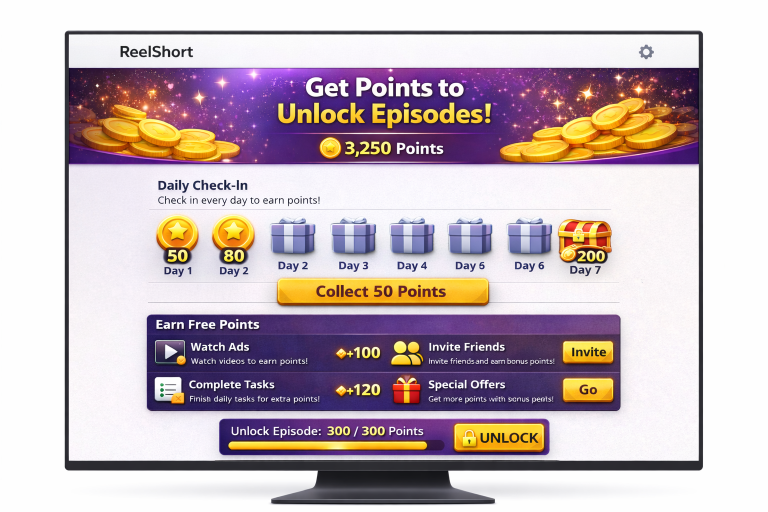
- Collect points and unlock episodes just as you would on a smartphone
This option provides full access to ReelShort’s rewards system.
How to Earn ReelShort Reward Points on a PC
When using an Android emulator, viewers may be able to:
- Collect daily login rewards
- Watch ads to earn points
- Complete tasks and in-app challenges
- Unlock episodes without spending money
When using the official website, some of these reward options may be restricted or unavailable.
Can You Watch ReelShort for Free on a PC?
ReelShort can be watched partly for free on a computer, particularly when accessed through an Android emulator. Although every episode may not be available at no cost, the rewards system can help viewers:
- Spend less overall
- Watch selected episodes for free
- Unlock complete series gradually over time
Advantages of Watching ReelShort on a Computer
- A larger screen for a more immersive viewing experience
- Improved audio when using external speakers or headphones
- Greater comfort during longer viewing sessions
- A convenient setup for binge-watching short dramas
Conclusion
Watching ReelShort series on a computer is entirely possible and may be a great choice for viewers who prefer a desktop setup. For the broadest access to free episodes and reward points, using an Android emulator is generally the most effective option.
Whether you choose to watch on a smartphone or a computer, ReelShort offers flexible ways to enjoy short-form drama series without always needing to pay.
🎥Watch a short ad to unlock your Series
You will be redirected to another website.